Rules
Rules decide whether an action is allowed, needs asking, or is denied. Agents can add rules. Only you can remove them.
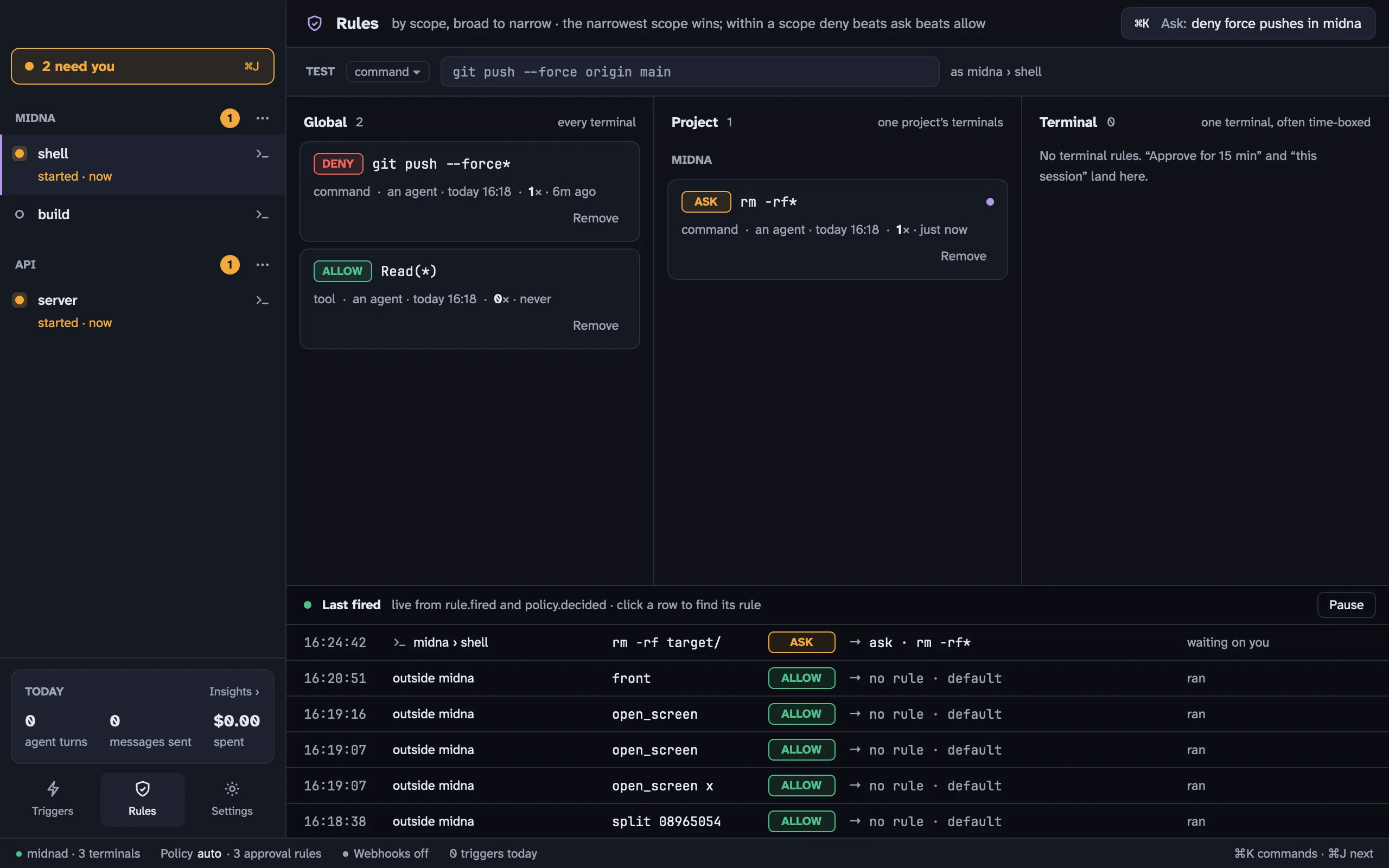
Open Rules from the sidebar, from ⌘ K, or with ⇧ ⌘ R. esc takes you back to the terminal.
What a rule is
Section titled “What a rule is”A rule has an effect, a kind, a pattern and a scope.
Effect
- allow: go ahead without asking
- ask: raise an approval and wait for your answer
- deny: refuse
Kind: what sort of action it matches.
| Kind | Matches | Example pattern |
|---|---|---|
tool |
Claude Code tool calls, as Tool(argument) |
Bash(rm -rf*), Edit(/etc/*) |
command |
A command line | git push --force* |
path |
A file path | ~/.ssh/* |
cli |
An agent’s own midna commands |
close --force* |
window |
An agent asking midna to act on a window | split* |
Claude Code checks every tool call against your rules before it runs, through the hooks midna launches it with. Codex has no hook for this, so rules don’t gate Codex’s tool calls; Codex’s own approval prompts still show up as permission prompts.
Pattern: a glob over the whole value. * matches anything, ? one character, and \ escapes the next character.
Scope: where it applies.
- Global: every terminal
- Project: every terminal in one project
- Terminal: one terminal, often time-boxed
A rule can also expire. Rules made by approving “for 15 minutes” do.
Which rule wins
Section titled “Which rule wins”- The narrowest scope that has a matching rule wins: terminal, then project, then global.
- Within that scope, deny beats ask, which beats allow. One exception: an allow you created by approving Always beats an ask in the same scope. Otherwise you’d be asked again every time.
- If no rule matches, the setting
policy.defaultdecides.
When nothing matches
Section titled “When nothing matches”policy.default is human only. Its values:
- auto (the default): agents’ destructive
midnacommands ask (close --force,restart,project remove,rules remove,settings reset), and everything else is allowed. A Claude Code tool call with no matching rule is left to Claude’s own permission settings. - allow, ask or deny: that decision for everything no rule matches.
Test an action
Section titled “Test an action”The Test strip at the top of Rules checks an action as the terminal you’re in, without running anything. Pick a kind, type a value and press ↩. You get the decision, the rule that decided it, and why every other rule did or didn’t match.
From a shell:
midna check command -- git push --force origin mainmidna explain command -- git push --force origin mainLast fired
Section titled “Last fired”The bottom of the screen is a live feed of decisions: the time, the terminal, the action, the verdict and the rule that made it, or “no rule · default”. An ask row fills in your answer once you give it. Click a row to find its rule.
Adding rules
Section titled “Adding rules”You rarely write rules by hand. They come from:
- approving with a scope: 15 minutes, 1 hour, this session and always each add an allow rule (see Needs you)
- asking an agent: the Ask button on the Rules screen opens ⌘ K with “Add a midna rule: …” ready to finish
- the CLI:
midna rules add deny command 'git push --force*'midna rules add ask tool 'Bash(rm -rf*)' --scope project:p_1a2b3cmidna rules add allow tool 'Bash(npm test*)' --scope session:ab12cd34 --expires 3600Removing rules: agents add, humans remove
Section titled “Removing rules: agents add, humans remove”Click Remove on a rule card and confirm. For ten seconds you can Undo, which brings the rule back with its id, author and history.
Agents can’t remove rules. An agent that thinks a rule is wrong runs:
midna rules request-removal r_9f8e7d --reason "blocks the release script"That becomes a rule removal item in Needs you, and a band at the top of Rules shows the rule, who asked and why, with Remove and Keep. Until you choose, the rule stays in force.